



Results for "how do i sign up for edocuments"
-
FAQ
How much does it cost to use Bill Pay?
Bill Pay is free for members and can be accessed by logging into your Digital Banking account.
Here are the steps to sign up for Bill Pay. -
FAQ
When do I get a new card? / Do I need a new card?
No need to request a new card! Your card will work through the expiration date printed. -
FAQ
How much can I borrow with a Home Equity Line of Credit (HELOC)?
You can typically borrow up to 80% of your home's value, minus what you still owe on your first mortgage.
For example, if your home is valued at $120,000 and your mortgage balance is $27,000, you could potentially qualify for a HELOC of around $69,000.
Keep in mind that this is a general estimate. Your actual limit may vary based on factors like credit, income and overall equity.
Need more than 80% loan-to-value (LTV)? We may still be able to help. Contact us to review your options. -
FAQHow can I add a sub-user to Business Digital Banking?
You can easily add a Sub-User by following these steps:
- Locate "Settings & Support" in the top navigation.
- Select "Business Admin."
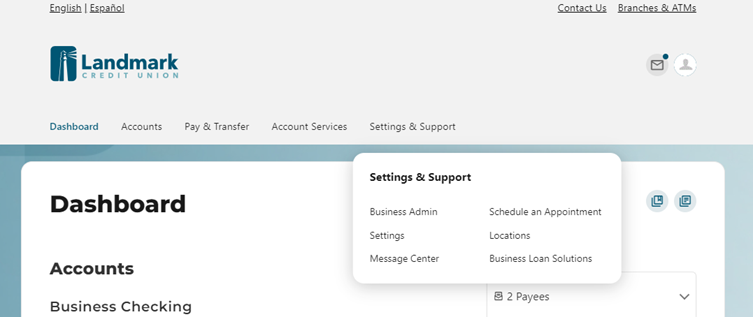
- Select Users
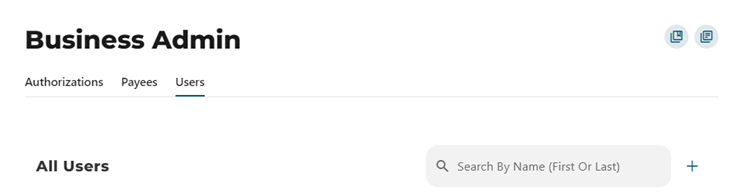
- Under the Users section, look for the "+" symbol. Click to initiate the process of adding a new user.
- Create a New User: This option will guide you through setting up the new user's access rights step by step.
- Copy an Existing User: If you already have a user with the desired access rights, you can copy their settings to the new user.
If you need further assistance with Business Digital Banking, contact us.
-
FAQ
How do I change my address with Landmark?
There are several ways to update your address:Option 1: Through Digital Banking
- Log into Digital Banking.
- Select your profile image in the upper-right corner.
- Select "Settings."
- Select "Contact."
- If needed, select the pencil icon next to your address, update it, and select "Save Changes."
Option 2: Through the Mobile App
- Log into the Landmark app on your phone.
- Tap your profile image in the upper-right corner.
- Tap "Settings."
- Tap "Contact."
- If needed, tap your address, update it, and tap "Save Email."
Option 3: Visit a Branch
Visit one of our branches to complete a change of information formOption 4: Send a Fax
Send a signed, written request via fax to our Help Desk at 262-799-4580.Option 5: Mail Your Request
Mail a signed written request to:
Landmark Credit Union
Attn: Help Desk
P.O. Box 510870
New Berlin, WI 53151-0870